


Chargeback alerts notify you when a customer attempts to dispute a transaction. This helps you take action to avoid disputes and prevent fees, reduce processing costs, and protect your merchant account health.
To start receiving alerts, connect your Merchant IDs (MIDs) and select the alert products that match your needs. You can handle alerts manually, automatically via webhooks, or through the payment platform integrations.
Step 1. Connect MIDs
You can add MIDs by specifying the required information in several steps.
To add a new MID manually
- Go to your Chargebackhit account > MIDs.
- Click on +Add MID.
- In the pop-up window, select products for the MID.
- Click on Continue to go to Settings.
Settings depend on the selected products. - Review information and click on Add to save the new MID.
If you need to enroll additional products for the added MIDs, you can enroll them directly from the MID details page.
To enroll more products in existing MID
- Go to your Chargebackhit account > MIDs.
- Find the needed MID and click on it.
- On the MID details page, click on Enroll next to the needed product.
- In the pop-up window, select the products you want to enroll.
- Review the MID information.
- Click on Add to apply changes.
When adding MIDs and filling in parameters, refer to:
- Product overview for information about the available products and alert typesPrevent product requires integration since alerts must be processed within seconds.
- Onboarding parameters for details on alert fields
- For RDR alerts, descriptor-BIN-CAID or descriptor-VISA ARNs are mandatory.
- For CDRN, Ethoca, and PayPal alerts, descriptors are mandatory.
- For PayPal alerts, descriptor and Merchant ID are mandatory.
If you use Stripe, Shopify, or Adyen, you can find the required information for the MID connection on their side.
Stripe
- Go to your Stripe account > Settings.
- Select the Business details tab.
- In the left-side panel, choose Public descriptor.
- Copy the descriptor and use it in Chargebackhit to add your MID.
To request BIN/CAID from Stripe support for prevention alerts
- Open the ticket with Stripe support or your point of contact.
- In your message, specify that you need BIN/CAID, for example:Hello Stripe Support Team,
We are integrating with the prevention alerts provider and need to obtain the BIN and CAID associated with our merchant account. Could you please confirm how we can access these parameters or provide them for our account?
Thank you - Submit the request and wait for the answer. Stripe support may either provide the BIN/CAID details directly or guide you to your acquiring bank if the data is not available.
To find ARNs
- Go to your Stripe account > Transactions > Refunds.
- Apply the following filters:
- Date: Last 120 days
- Card brand: Visa
- Refunded: At least 3 days ago
- Select the needed transaction.
- Find the ARN in the Payment breakdown section.
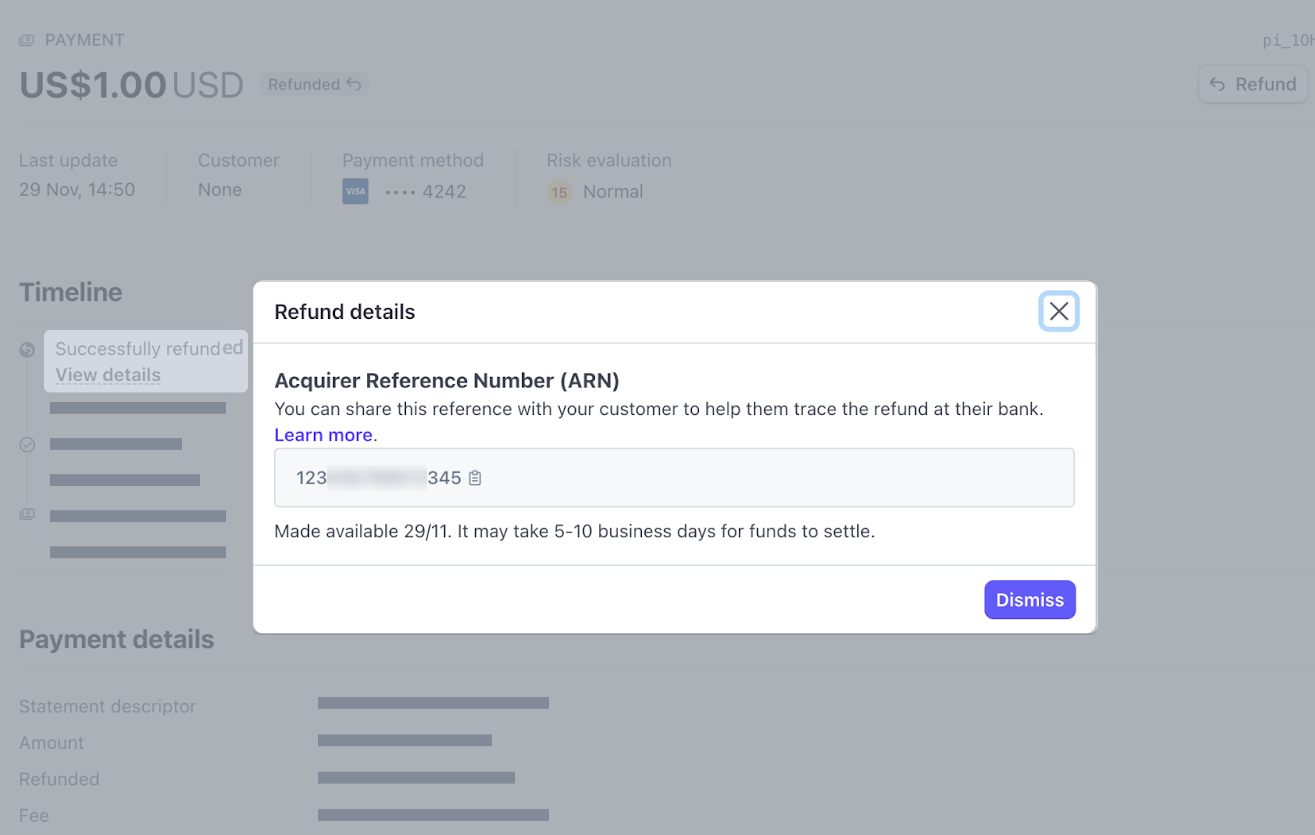
- Copy the ARN and use it in Chargebackhit to add your MID.
Shopify
- Go to your Shopify admin account > Settings.
- Select Payments.
- Under the Payment section, click Manage.
- Scroll to Customer billing statement to find the descriptor.
- Copy the descriptor and use it in Chargebackhit to add your MID.
To find the ARNs
- Go to your Shopify admin account > Orders.
- In the search bar, type VISA to filter related transactions.
- Apply a filter based on the Refunded payment status.
Choose a refunded order that is at least 3 days old but no older than 120 days.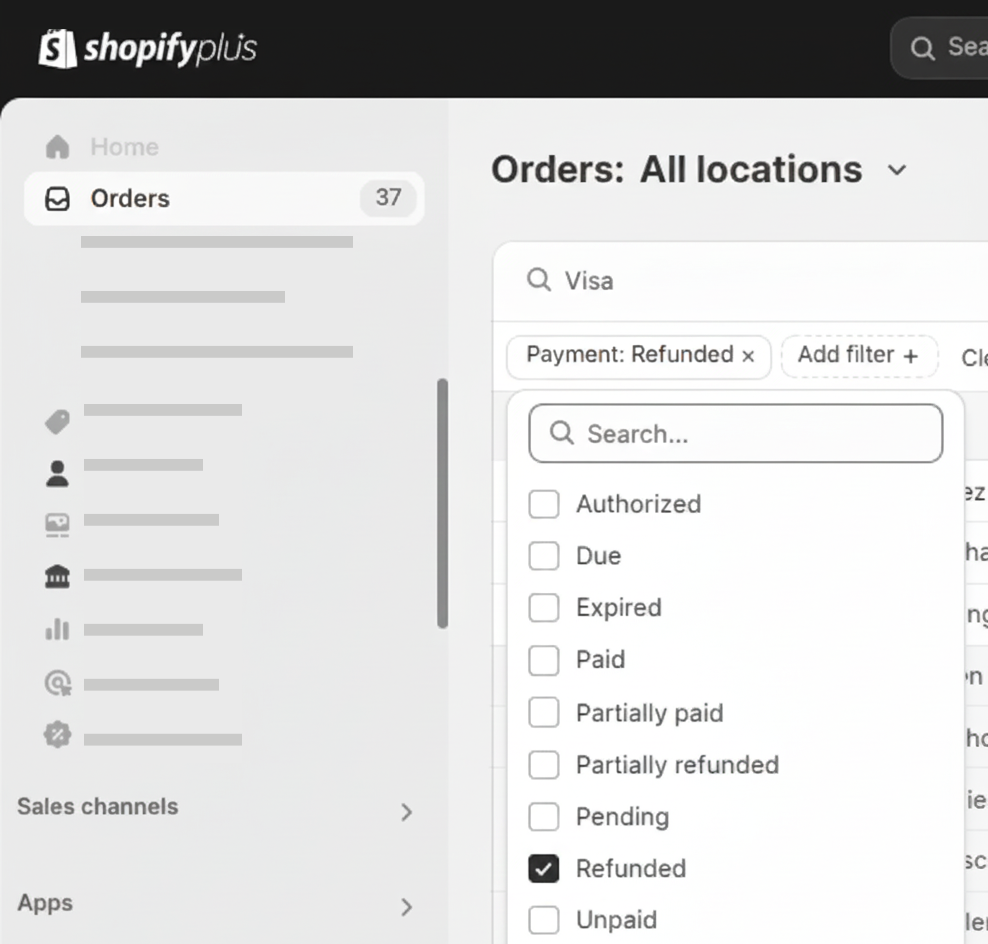
- Scroll down the order refund timeline to find the ARN.
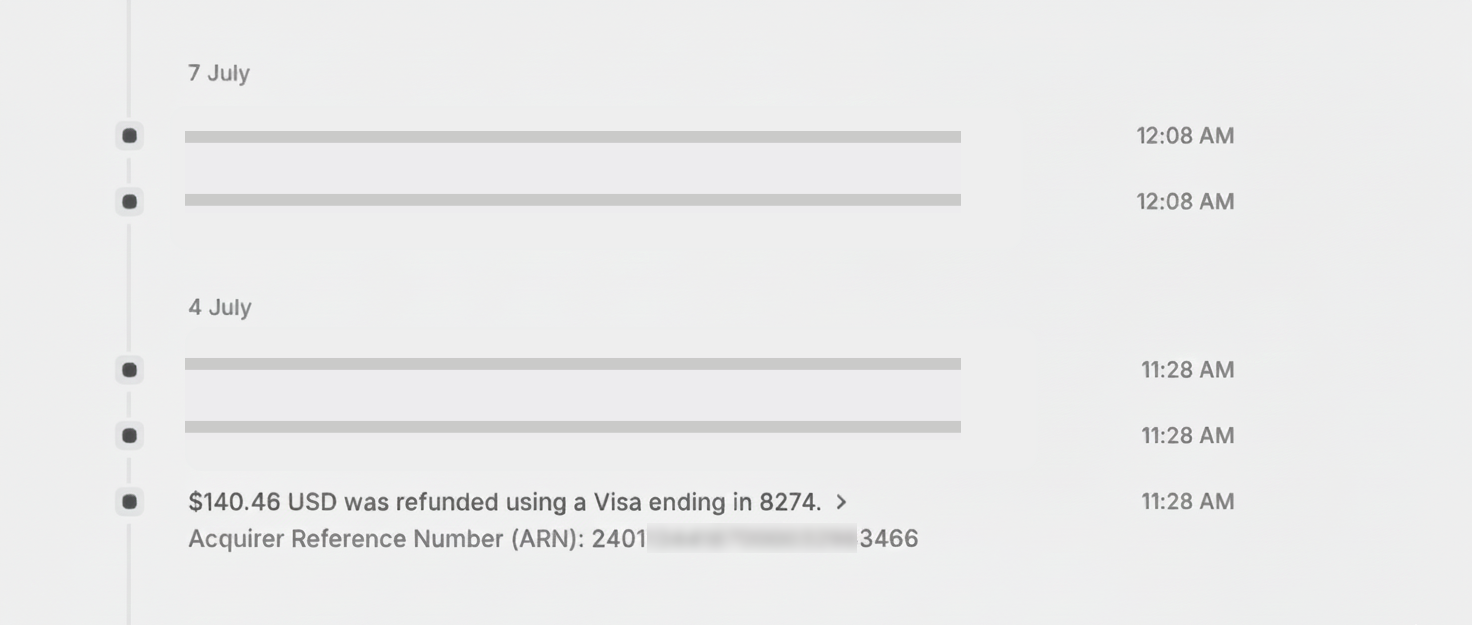
- Copy the ARN and use it in Chargebackhit to add your MID.
Adyen
- Log in to your Adyen Customer Area.
- Select the relevant account.
- Go to Settings and click on Transaction description.
- Find the payment descriptor shown on customer bank statements.
- Copy the descriptor and use it in Chargebackhit to add your MID.
To find the ARNs
- Log in to your Adyen Customer Area.
- Navigate to Transactions > Payments.
- Select the PSP reference for the refunded transaction.
- Check Payment events and find the ARN number under ARN.
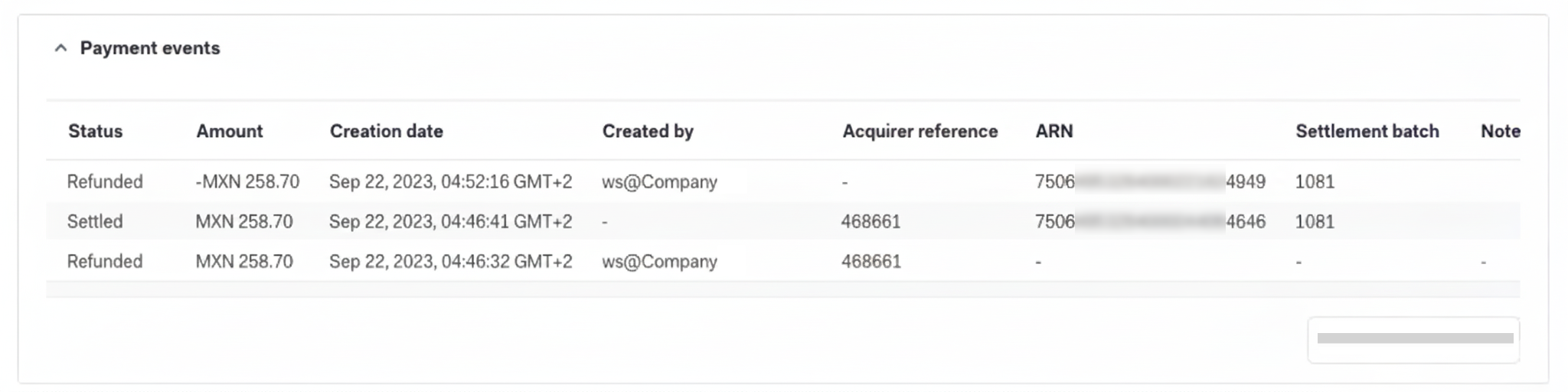
- Copy the ARN and use it in Chargebackhit to add your MID.
See the Adyen documentation for more details on descriptor and ARNs.
Step 2. Handle alerts
You can handle alerts by using the payment platform integrations, manually, or automatically via webhooks.
Handle via integration
If you use a payment platform supported by Chargebackhit, you can connect it to automate alert handling. Check the available integrations in Chargebackhit HUB and follow the integration setup instructions to implement automatic alert matching for:
- Integration
Connect your Stripe account to automate alert matching and simplify operations. Stripe - Integration
Link your Checkout Champ account to automate alerts and improve workflow control. Checkout Champ - Integration
Integrate your 29 Next account to automate alerts and support efficient monitoring. 29Next
Handle manually
To handle alerts manually
- Open the received alert in Chargebackhit HUB .
- Find the transaction in your system using the alert parameters.
For example, card number, amount, currency, ARN, auth code, transaction ID. - Make a refund.
- Submit your response in Chargebackhit HUB.
Refer to the outcome types to learn which response to use for each alert type.
RDR alerts with the resolved type do NOT require any further action such as matching or refunds. Refunds must be processed for:
- CDRN alerts (init-refund type): response time is 72 hours
- Ethoca alerts (init-refund type): response time is 48 hours
Handle via webhooks
To handle alerts automatically via webhooks
- Connect to Chargebackhit Webhook API .
- Set up the automatic alert matching algorithm on your side.
PayPal alerts
PayPal alerts are processed automatically and do not require manual handling. You need MID descriptor and Merchant ID for adding MID.
To activate PayPal alerts
- Go to your PayPal account > Account settings.
- Find your dynamic descriptor.
PayPal adds the prefix PAYPAL * by default. - Navigate to the Business information section, find your PayPal Merchant ID.
Check PayPal documentation for details.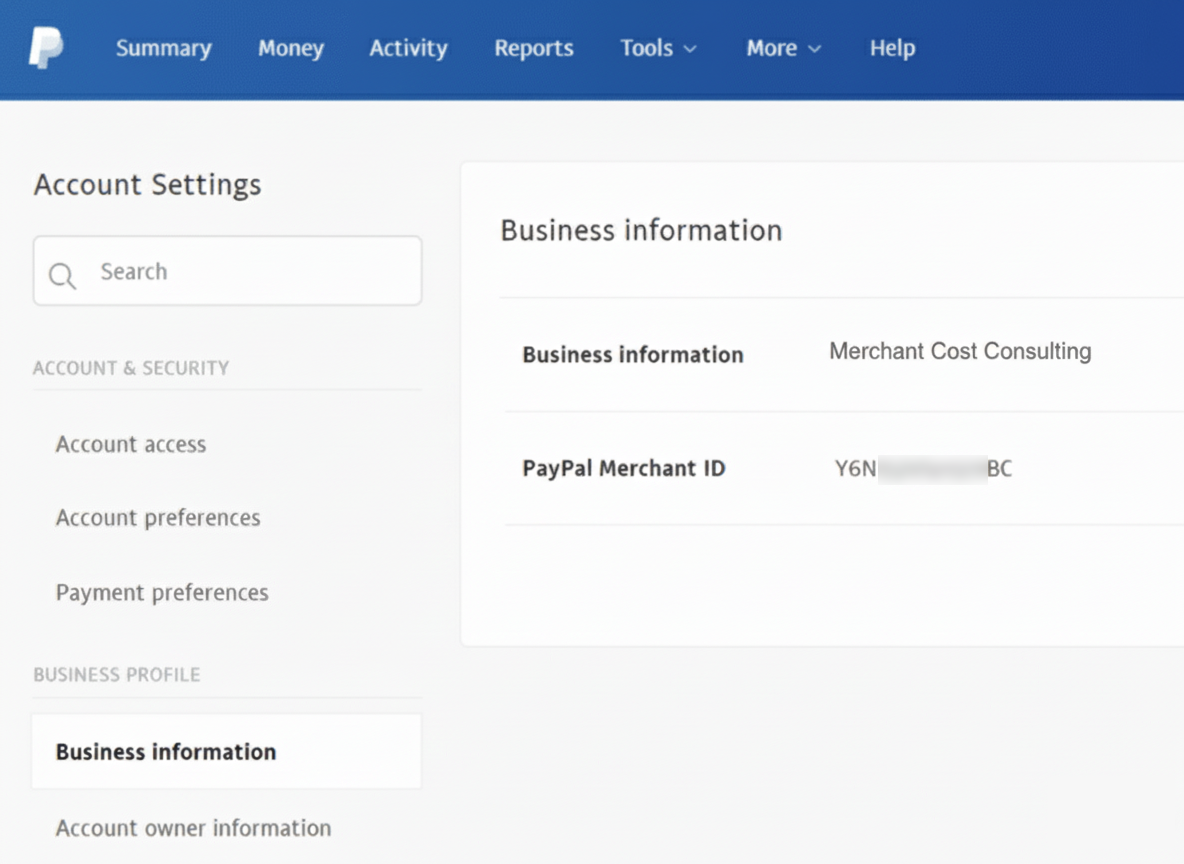
- Go to Chargebackhit HUB and add a new MID using your descriptor and Merchant ID.